Torki Code
Usage, Plans and the Context Meter
Overview
Two things limit how much you can do in Torki Code. Your plan's message allowance limits how many requests you can send in a rolling 5-hour window. The conversation's size limits how much one conversation can hold before Torki has to condense it. Torki Code shows the first in its usage panel and the second in the context meter in the status bar.
What it needs
Torki Code is included on every plan and uses the same message allowance as chat on Home and on torkiai.com. Free has 25 messages per 5 hours, Lite 120, Arc 400 and Zenith 1,500. Stellar and Cosmos need Lite or above.
Get started
1. Open the usage panel
Start a new conversation with New session in the sidebar (⌘N). An empty conversation shows the usage panel in place of messages. It goes away when you send your first message.
2. Check what you have left
Read the Current session bar and the beakers under "What you have left". The bar tells you when your allowance resets.
3. Keep an eye on the context meter
While you work, the percentage near the right of the status bar shows how full the current conversation is. When it turns red, start a new session for a fresh start.
The usage panel
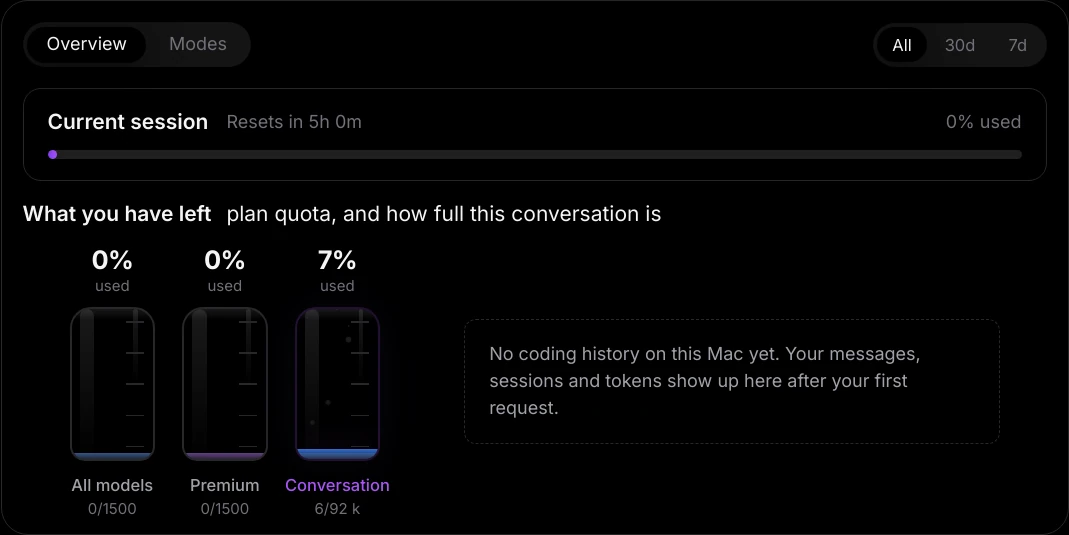
The panel has two tabs, Overview and Modes, and a range switch, All, 30d or 7d, for your history on this Mac.
Overview
- Current session — how much of your plan's 5-hour allowance you have used, as a percentage, and when it next frees up ("Resets in 4h 20m", or "Resets shortly"). It follows whichever allowance is fullest, so generating images on Home can move it too.
- What you have left ("plan quota, and how full this conversation is"), drawn as beakers:
- All models — your message allowance, with the count underneath, such as "2/25".
- Premium — the Stellar and Cosmos messages you sent in chat on Home and torkiai.com. It is a view of the same message allowance, not a second one, so its limit is the same number. Torki Code requests count under All models whichever mode you pick. On Free it shows a padlock, "Locked" and "Upgrade to lite".
- Conversation — how full the open conversation is, in thousands of characters ("6/92 k") or, for a long run of steps, in steps. Even a new conversation shows a few per cent. It may be missing until Torki has measured the conversation.
- Your coding history on this Mac — Messages, Sessions, Tokens in and Tokens out. Before your first request it reads "No coding history on this Mac yet."
Modes
A picture of how you work, from this Mac's history: Active days, Current streak, Longest streak, Peak hour and Avg turn, a bar for each response mode you used, and how many tool calls Torki made.
The Current session bar and the beakers come from your Torki account, so they match Settings → Usage on torkiai.com. The history figures (Messages, Sessions, Tokens and everything on Modes) are kept only on this Mac, separately for each account that signs in. They do not include what you did on another Mac or on the web.
If the panel says "Sign in on Home to see your plan usage.", you are signed out. "Could not reach your usage right now." means the figures could not be loaded; try again in a moment.
What counts as a message
- One request is one message, however much work it involves: reading files, writing them, running tests and fixing what it finds — up to 200 model steps. Past that Torki stops with "This task has used all 200 model steps one message allows. Send a new message to keep going." Your follow-up is a new message.
- Every send is a request, including Edit and resend, Try again (which sends the question that answer was for once more) and a follow-up such as "carry on".
- What you do yourself is free. Undo a file change, Pull, Push, switching or creating a branch, committing in Source Control and opening a project on a server do not ask Torki anything, so they use no messages.
- The allowance is shared with chat on Home, torkiai.com and the mobile apps. A message spent in one place is gone from all of them.
- Effort and response mode do not change the cost. A Thorough request is still one message. Thorough allows up to 400 steps, though, so a very long Thorough task can reach the 200-step limit first.
- Generating images uses the image allowance, not messages — see below.
Plan allowances
- Free — 25 messages per 5 hours. Pulse and Orbit.
- Lite — 120 messages per 5 hours. All four modes.
- Arc — 400 messages per 5 hours. All four modes.
- Zenith — 1,500 messages per 5 hours. All four modes.
The window rolls: messages you sent five hours ago free up now, rather than everything resetting at a fixed time. See Usage Limits & How They Work and Subscription Plans.
When you run out
A card appears in the conversation: "You have used all your messages on" your plan, a bar with "25 of 25 messages" (or your plan's numbers), and "Resets in …". "Your work is saved. Send this again once your messages reset." Nothing Torki already did is lost. The card's See button (for example See Lite) opens the plans page in Home.
The context meter
Every conversation has a limit on how much Torki can hold at once: your messages, what Torki read, the output of commands and its own replies. The context meter near the right of the status bar shows how full the current conversation is, from 0% upwards. It turns amber at 75% and red at 90%.
Hover over it, or click it, for a sentence such as "Conversation is 55% of what Torki can hold. Past 100% the oldest steps are condensed into a summary rather than sent in full." From 90%: "This conversation is nearly full — Torki is condensing the oldest steps into a summary to keep going. Start a new session to give it a clean slate."
Condensing
Condensing means Torki writes a record of the conversation so far and carries on from that record instead of the full transcript.
- The note. When 30% or less is left, a note above the composer reads, for example, "24% of context left before Torki condenses this thread." with Condense now.
- Automatically. At 82% full, Torki condenses by itself, with the same "Condensing the thread" card described below.
- Whenever you choose. Click Condense now, or type
/condense.
A card, "Condensing the thread", shows its progress — "Reading the thread", "Writing the record", "Folding it back in" — with a Stop button. When it finishes, the record is folded into the conversation and the card shows the change, such as "88% → 31% full".
- "Torki is working — stop it first, or wait." — you cannot condense while Torki is in the middle of a request.
- "There is not enough here to condense yet."
- "Condensing stopped — nothing was changed." or "Could not condense the thread. Nothing was changed." — try Condense now again.
- If a request arrives while the conversation is past what Torki can hold, you see "This conversation has grown past what Torki can hold at once." — "Torki is condensing it. Send that again when it finishes."
- If Torki's servers turn a conversation away as too long in the middle of a request, Torki drops the earliest steps and says "This conversation got long — condensing the earliest steps to keep going."
A fresh session is often better than a condensed one. A summary keeps the gist, not every detail. When one task is done and you move to another, click New session. The old conversation stays in Sessions.
Generating images
Torki Code can generate an image and save it into your project as a PNG, JPG or WebP file — for example a placeholder hero image or an icon. Each one takes about 8 seconds. The step appears with its internal name, generate_image, and a wrench icon, and the image is listed in the Ledger with the prompt that made it.
- Images use your plan's image allowance, not messages: 5 images per 5 hours on Free, 30 on Lite, 150 on Arc and 500 on Zenith.
- The image allowance is not shown in Torki Code's usage panel. Check it in Home or on torkiai.com under Settings → Usage.
- Saving the image is a file write, so it follows your permission mode. In Manual a Write to a file card reading "Save image" and the path asks first. The image has already been made by then, so denying the card still uses one from your image allowance.
Good to know
- Pictures have a limit of their own: a message carries at most 8, and a video you attach usually takes 4 of them. See Asking Questions and Giving Tasks.
- Opening another folder or starting a new session resets the context meter; your plan's allowance is not affected.
- Shadow and Deep Research have their own allowances and are not used by Torki Code. The Free plan includes neither.
FAQ
Why does one request show many steps but only one message used?
Torki Code counts the request, not the steps inside it, up to 200 model steps.
Do messages in Torki Code come out of the same allowance as my chats?
Yes. Home, torkiai.com, the mobile apps and Torki Code all share one message allowance.
I used Stellar in Torki Code, but the Premium beaker did not move.
Premium fills with Stellar and Cosmos chats on Home and torkiai.com. Torki Code requests count under All models, one message each, whichever mode you pick.
Why is my coding history different on my other Mac?
Messages, Sessions, Tokens and the Modes tab are kept on each Mac separately. Only the Current session bar and the beakers come from your account.
Can I make a conversation hold more?
No, but you can make room: condense it with /condense, or start a new session for each separate task.
Is there a limit on how many sessions I can keep?
Torki keeps up to 40 conversations per folder on each Mac. See Sessions, History and the Ledger.