Torki Code
Guarded Mode and Privacy
Overview
Torki Code works inside one folder at a time: the one you opened. That folder is the boundary for everything Torki does to files. Commands are handled differently, because they run in a real shell, so on a Mac Torki confines what they can write. The Guarded shield in the status bar is the reminder that this is in force.
For a project on a server, Torki works on a copy of the server folder kept on this Mac and sends every save to the server. The folder boundary applies to that copy, but commands run on the server and are not confined there — see Server projects below.
The model that answers you runs on Torki's servers, not on your Mac. This article explains what Torki sends there to do its work, and what stays on your Mac.
What it needs
Torki AI for Mac with a folder open in Code. Command confinement uses a protection built into macOS and needs nothing from you. Settings → Workspace → Commands shows whether it is working on your Mac.
Get started
1. Check the shield
With a folder open, look at the left of the status bar. After the branch and the folder path you will see a green shield labelled Guarded. Its tooltip reads "Filesystem access is confined to the open workspace".

2. Click it for the details
Click Guarded and Torki posts a short explanation into the conversation: how file access is checked, how commands are handled on this Mac, and which permission mode is in force.
3. Check that commands are confined
Open Settings (the gear at the end of the row of icons in the sidebar) and scroll to Workspace. The Commands row reads "confined to this folder" on a Mac where confinement is working. If it reads "not confined — asks first", Torki asks before every command, even in Full auto.
On a server you have trusted, this row also reads "confined to this folder". That is not true there: nothing confines commands on a server. Use the row to check your Mac, with a project on this Mac open.
The folder is the boundary
Every time Torki reads, writes or deletes a file, it first works out where that path really leads. Anything that ends up outside the folder you opened is refused — not asked about, refused — in every permission mode. That includes the tricks that would otherwise get round it:
- Symlinks. A link inside your project that points somewhere else is followed to its real location first, and refused if that is outside.
- Relative paths.
../paths that climb out of the folder are refused. - The repository's own
.gitfolder. Torki's file tools do not write there. To change the repository it uses its git tools, and you use Source Control — see Source Control and Git.
Torki's file tools also never touch files that look like credentials, in any mode: .env files, .pem and .key files, id_rsa, .p12 files, credentials files, and anything under .ssh or .aws. If Torki tries, it is told "… looks like a private key or credential file". The editor will not open them either: "Torki does not open private-key or credential files."
How commands are confined on a Mac
A command is different from a file tool. It runs in a real shell, and the shell could cd anywhere. So on a Mac, every command Torki runs is wrapped in a macOS sandbox that controls where it can write:
- Allowed to write: your project folder; temporary folders (
/tmp,/private/tmp,/var/tmpand your own temporary folder); and the caches that package managers and build tools use, such as~/.npm,~/.cache,~/Library/Caches,~/.cargo,~/.rustup,~/go/pkg/mod,~/.gradle,~/.m2,~/.pub-cache,~/.gem,~/.nuget,~/.deno,~/.bun/install/cacheand~/.pnpm-store. That is why installs and builds work normally. - Not allowed to write: anywhere else — including
/opt/homebrew,/usr/local,~/.gitconfig,~/.zshrc,~/.sshand the project's own.gitfolder. - Reading is not restricted. A confined command can still read files elsewhere on your Mac. The command card says so: "Writes are confined to this folder. The command can still READ files elsewhere."
This applies to commands Torki runs. The terminal in the bottom panel is your own shell and is not confined — that is why it asks for your consent before it opens.
What this means in practice
brew installandnpm install -grun by Torki fail with "Operation not permitted", because they write outside the project. Run them yourself in the terminal.- Torki cannot create or switch git branches, tags or stashes, because those write into
.git. Torki explains this when it happens: "Torki confines commands so they cannot write to .git. This is not a broken repository and not a stale lock…". You can switch or create branches yourself by clicking the branch name in the status bar, and run tags, stash and similar commands yourself in the terminal. Staging and committing work, through Torki's git tools and Source Control. - Commands Torki runs never wait for a password, a pager or an editor, and stop after 120 seconds by default.
When Torki asks instead
If macOS confinement is not available, Torki cannot promise that a command stays in the folder. Instead of running commands unchecked, it asks before each one, in every mode. The command card then shows, in amber: "A command runs with your account's permissions and CAN reach files outside this folder." Settings → Workspace → Commands reads "not confined — asks first".
How often Torki asks the rest of the time is set by the permission mode — see Permission Modes and Approvals.
Server projects
When the open project is on a server (see Working on a Project on a Server), the boundary works like this:
- Files. Torki reads and writes a copy of the server folder kept on this Mac, and the folder boundary and the credential-file rule apply to that copy exactly as they do to a local project. Every save is sent to the server.
- Commands are not confined. Commands, tests, code checks, git, development servers and the terminal run on the server, as your ssh user. The macOS protection applies only on your Mac, and nothing limits what a command can reach on the server.
- So Full auto asks first. Until you choose Trust this server in the location menu, Full auto asks before every command there. Manual and Accept edits ask before every command anyway.
- The shield says so. On a server project, the Guarded shield's tooltip reads "Files: Torki reads and writes only inside" the project's path on the server, followed by "Commands run on" the server "as your ssh user — Torki asks before each one." Once you trust the server, it ends "this server is trusted, so Full auto runs them without asking."
What is sent to Torki's servers
Settings → Privacy → What leaves this machine sums it up:
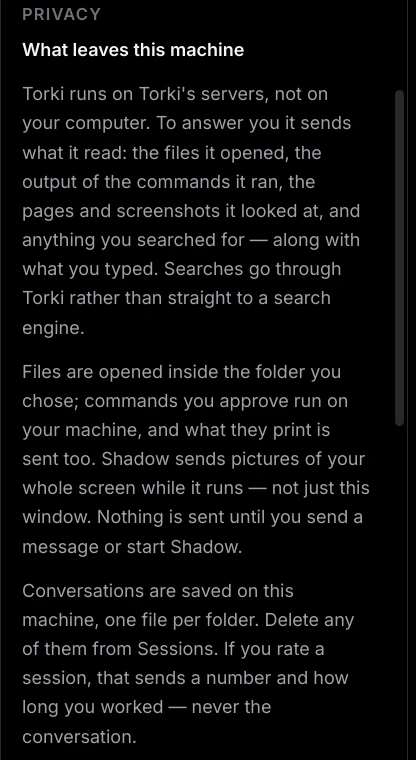
Torki runs on Torki's servers, so to answer you it sends:
- What you typed, and any files, photos, documents or recordings you attach.
- What Torki read — the files it opened, the output of the commands it ran, the pages and screenshots it looked at, and anything it searched for. Web searches go through Torki rather than straight to a search engine.
- Your project instructions — the text of
TORKI.mdand any skills Torki loads. - The names of what you have open — open editor tabs and open Horizon pages, so Torki knows what you are looking at.
- Speech, when you use it — dictation audio is sent to be turned into text. For a recording with sound, Torki asks first whether to send the sound track. Voice on Home sends your voice to torkiai.com, as it does in a browser.
- Image prompts, when Torki generates a picture.
Nothing is sent until you send a message, dictate, or start Shadow. Files are only opened inside the folder you chose; commands you approve run on your Mac, or on your server for a server project, and what they print is sent too. For a server project, Torki is also told the server's name and address and the folder's path there, so it knows where its commands run.
A command can read files the file tools refuse. Confinement limits what a command can write, not what it can read, and a command's output is sent with the conversation. If a command Torki proposes would print a secret — cat .env, for example — deny it.
Shadow sends your whole screen
Shadow, the BETA screen helper on Home, is separate from Code. While Shadow runs, it sends pictures of your whole screen, not just the Torki window. Close anything private before you start it.
What stays on your Mac
- Code conversations — saved on this Mac, one file per folder, for your account. They do not sync to torkiai.com or to your other Macs. See Sessions, History and the Ledger.
- The Ledger, your local usage history, the copies Torki keeps for undo, your recent folders, your preferences, which projects you trusted, and Horizon's bookmarks and history.
- Server projects — the copies of server folders Torki works on, and, for each account, your saved servers, the servers you trusted and your recent server projects.
All of this lives in ~/Library/Application Support/torki-desktop/. Your plan's message count is the exception: it is kept by Torki's servers, because it is shared with chat on Home and the web.
Deleting conversations
Open Sessions in the sidebar and click the trash button (Delete session) on any row. Conversations you have with no folder open are never saved in the first place.
Session ratings
After a while in a session, Torki may ask "How is Torki doing this session?" with Average, Doing well and Superb. If you answer, it sends the rating, the app version, how many turns the session had and how many minutes you worked — never the conversation. Click × to skip it.
Good to know
- macOS may ask for folder access. The first time you open a project in Documents, Desktop or Downloads, macOS may ask whether Torki may use that folder. The explanation reads "It only reads and writes inside the folder you choose." If you said no, turn it on in System Settings → Privacy & Security → Files and Folders.
- Opening another folder resets your grants. "Always allow" approvals and running terminals belong to the folder they were given for, and end when you switch. Terminal consent is the exception.
- Projects Torki creates go in
~/Torki Projects/, and that new folder becomes the boundary. - For how Torki handles what it receives, see the Privacy Policy.
FAQ
Can Torki read files outside my project?
Not with its file tools: those are refused. A command Torki runs can read outside the project, though it cannot write there on a Mac. That is one reason commands ask in Manual and Accept edits.
Does Full auto turn off Guarded?
No. Permission modes only change how often you are asked. The folder boundary, the credential-file rule and command confinement apply in every mode.
Why did git checkout -b fail with "Operation not permitted"?
On a Mac, commands Torki runs cannot write into .git, so it cannot create branches. Nothing is wrong with your repository. Create the branch yourself: click the branch name in the status bar, or use Create branch… in the command palette. You can also run the command yourself in the terminal.
Are my Code conversations on torkiai.com?
No. They are saved on this Mac only, per folder and per account, and do not appear in your chat history on the web or on Home.
Does Torki send my whole project?
No. It sends what it actually opens, runs or looks at while working on your request, plus the names of your open tabs.