Mobile & Desktop
Torki AI for Mac
Overview
Torki AI for Mac is one app with two halves, switched at the top of the sidebar. Home is the Torki web app you already use, inside a window of its own. Code is Torki Code: a workspace where Torki reads and changes the files in a folder on your Mac, or on a server you reach with ssh, runs commands and checks its own work.
This article covers installing the app, signing in, the two halves, updates, the Dock and menu-bar icon, notifications, quitting and uninstalling. For Torki Code itself, start with Getting Started with Torki Code.
The current release is 1.10.8.
What it needs
An Apple Silicon Mac (M1 or later) running macOS 11 or later. There is no Intel build.
A Torki account and an internet connection. Torki runs on Torki's servers, not on your Mac, and Code cannot be opened while you are signed out. The app uses the same plan and the same allowance as torkiai.com; there is no separate subscription.
Windows and Linux versions are not available yet. In the meantime use torkiai.com in a browser, or the iOS and Android apps.
Get started
1. Download
Get the disk image (.dmg) from torkiai.com/downloads.
2. Install
Open the disk image and drag Torki AI into your Applications folder. Then open Torki AI from Applications. The app is signed and notarised, so macOS opens it like any other app.
3. Sign in
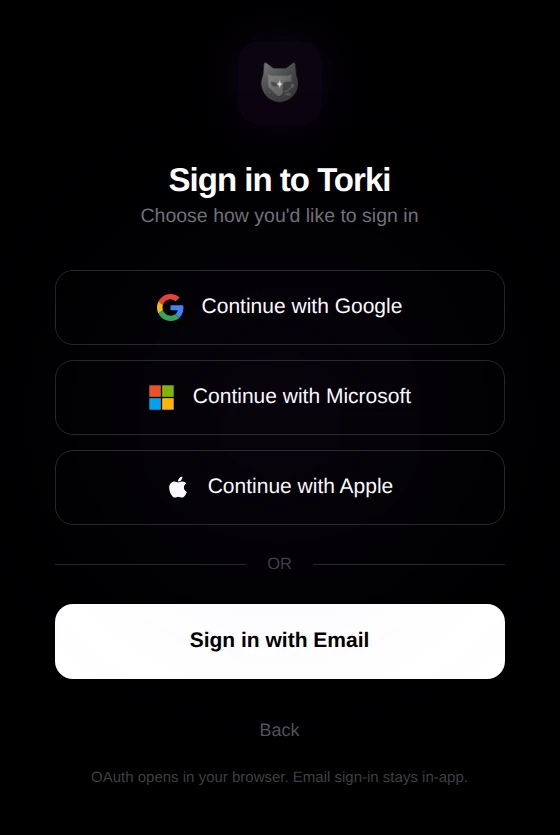
The first time you open it, Home shows "Welcome to Torki AI". Click Sign in with Torki, then pick how to sign in:
- Continue with Google, Continue with Microsoft or Continue with Apple — these open in your web browser. Once you have signed in there, the browser hands you back to the app. If the browser asks whether to open Torki AI, allow it.
- Sign in with Email — this stays inside the app.
When you are signed in, the account chip at the bottom of the sidebar shows your name and your plan, such as "Free Plan". The app keeps you signed in between launches.
4. Let it bring itself up to date
The disk image on the downloads page can be an earlier release than 1.10.8. The app updates itself: shortly after you open it, it checks for a newer version and downloads it in the background. When the update card appears at the bottom of the sidebar, click it and choose Restart and update — see Updates below.
Check your version. Switch to Code, click the gear in the sidebar to open Settings, and look at Version under Workspace. These articles describe 1.10.8. On an earlier version much of what they describe is missing or works differently — for example attaching PDFs, Office documents, photos and recordings, projects on a server, Pull and Push, the branch picker and the Undo list — so let the update install first.
What is kept on your account, and what stays on this Mac
- On your Torki account, the same everywhere you use Torki: your Home chats, projects, agents and plan. These live on torkiai.com.
- On this Mac, kept separately for each account that signs in: your Torki Code conversations (Sessions), the Ledger, the Horizon browser panel's history and saved pages, the coding history in Code's usage panel, and your saved servers, the servers you trusted and your recent server projects. None of this syncs to the web or to your other Macs.
- On this Mac, shared by everyone who uses it: the list of recent folders, the file tabs a folder had open, Code's Settings preferences, and each folder's Undo a file change list.
Cookies and other site data in the Horizon browser panel are cleared whenever the sign-in changes, including each time Torki AI starts and signs you back in, so you sign in to sites there again after relaunching.
To sign out, click the account chip at the bottom of the sidebar (or the ⋮ beside it) and choose Log out. Torki asks "Log out of Torki?" first.
Home and Code
Switch between the two halves with Home | Code at the top of the sidebar, or press ⌘1 for Home and ⌘2 for Code. ⌘B hides or shows the sidebar. Torki AI opens where you left it: if you quit on Code, it comes back on Code once your account has loaded. If you are signed out, it opens on Home.
Home
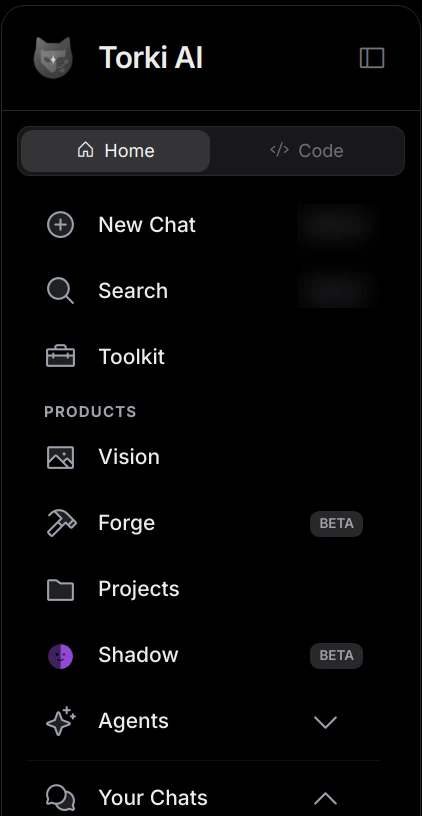
Home is the Torki web app from torkiai.com, signed in to the same account. While it loads you see "Loading the Torki app…". The app's own sidebar takes the place of the website's sidebar and lists New Chat and Search (their shortcuts, ⌘N and ⌘K, are shown beside them), Toolkit, Partner (only if you are a Torki partner), then under Products: Vision, Forge (BETA), Projects, Shadow (BETA) and Agents, and finally Your Chats. Your chats are grouped as on the website — Today, Yesterday, Previous 7 Days, then by month — and each shows its time.
Point at a chat under Your Chats and click ⋯ for Share (it copies a link: "Share link copied"), Rename, Archive, Download PDF, Add to Projects and Delete. Download PDF shows "Generating PDF…", saves the chat as a PDF in your Downloads folder, says "Saved to" with the file name and shows the file in Finder. Delete asks first ("Delete chat") and cannot be undone. Agents opens the built-in agents — Torki, Elli, Poppy, Eywa, Kalli, Pooline and 61 — and a My Agents button.
While you are signed out, the sidebar shows "Sign in to use Torki" with a Sign in button, and the account chip reads "Signed out" and "Switch to Home to sign in".
- Voice: voice on Home works. The microphone is allowed for torkiai.com inside Home, for sound only (never the camera). The first time, macOS asks for permission. In Code, the microphone is used for dictation.
- Shadow is a BETA feature that works on your Mac's screen. It asks for Screen Recording and Accessibility permission before it can work. The Free plan has no Shadow allowance. Before it takes control, a dialog asks "Shadow wants to control your computer" and says it will capture your screen, move your mouse and type, show a purple border while it is active, and stop when you press Esc. Choose Allow or Deny (Deny is the default). Ticking Trust Shadow for the rest of this session stops the question until you quit Torki AI. The tick counts whichever button you press, so leave it clear when you deny.
Code
Code is Torki Code. You open a folder, then ask Torki about it or give it a task, and you decide what it may do without asking. See Getting Started with Torki Code. The folder can also be on a server you reach with ssh — see Working on a Project on a Server.
The account menu
Click the account chip or the ⋮ beside it:
- Settings — opens your torkiai.com account settings in Home. Torki Code's own settings are behind the gear in the Code sidebar.
- Theme → Dark, Light or System — the theme for Home and the window.
- Upgrade Plan, which opens the plans page in Home.
- Help → Help Center, Contact Torki and Privacy Policy.
- Shortcuts, which opens the command palette.
- Log out.
The download icon beside the chip, "Download Torki apps", opens the downloads page in Home.
Updates
Torki AI updates itself. It checks shortly after you open it and every six hours after that, and downloads a new version in the background. Nothing pops up while it checks or downloads (the Version row in Code's Settings shows a download in progress), and a failed check stays silent.
When a download is ready:
- macOS shows a notification: "Torki 1.10.x is ready. It will install the next time you quit." (with the real version number).
- An update card appears at the bottom of the sidebar, above the account chip: "Torki 1.10.x is ready" and "Installs when you restart".
- A purple dot appears on the Settings gear in the Code sidebar. If the sidebar is collapsed, the dot is on the "Show sidebar" button instead.
Installing it
- Click the update card. Clicking it does not restart anything; it opens a sheet that tells you what restarting will do.
- Under Before you restart, the sheet lists only what applies: files with unsaved changes (with Save or Save all), "Torki is working on a task" (restarting stops it before it finishes), and open terminals (anything running in them stops).
- Click Restart and update. Torki closes, installs the new version and opens again by itself. Or click Later; nothing changes, and the update installs the next time you quit.
You can also restart from Code's Settings: under Workspace, a row reading "1.10.x is ready" has a Restart and update… button.
- The conversation you had open is not carried across the restart; a new one starts. Finished conversations are in Sessions. If Reopen last folder is set to When Torki starts, your folder opens again if it is on this Mac (a server project is reopened from the location menu).
- If you see "Torki did not restart", nothing was changed. The update installs the next time you quit Torki.
- While it installs, the sheet reads "Installing Torki 1.10.x" and the button "Restarting…". If it reads "This update is no longer ready", nothing was closed or changed; Torki keeps checking and shows the next update in the sidebar once it has downloaded.
There is no "Check for updates" button. If the Version row in Code's Settings keeps showing your version followed by ", downloading" and the new version for a long time, quit Torki AI and open it again.
The window, the Dock and the menu-bar icon
The red close button hides the window. Torki AI keeps running, and so does anything it is working on. To bring the window back, click Torki AI in the Dock, choose Open Torki or Open Code from the menu-bar icon, or open the app again from Applications. ⌘W (File → Close Window) hides the window in the same way when the Chat tab is in front or you are on Home; on a file tab it closes that tab instead.
The Torki icon in the menu bar has this menu:
- Open Torki — brings the window forward on Home.
- Open Code — brings the window forward on Code.
- Shadow — opens Shadow in Home.
- Settings — your torkiai.com account settings, in Home.
- Quit Torki.
While Shadow is controlling your Mac, the menu changes to Stop Shadow Control, Open Torki and Quit Torki. Pressing Esc also stops Shadow control.
There is no system-wide keyboard shortcut that summons Torki from another app. The Mac menu bar has the usual menus: Torki AI (About Torki AI, Hide Torki AI, Quit Torki AI), View with Actual Size (⌘0), Zoom In (⌘+), Zoom Out (⌘-) and full screen, and Help with Help Center, Contact Torki and Privacy Policy.
Notifications
Torki tells you when it needs you or has finished, but only while you are away from it — in another app, with the window hidden, or on Home.
- When Torki needs an answer: "Torki wants to write a file" (writes, new folders, moves, staging, commits, Pull and Push), "Torki wants to run a command" (commands and Horizon pages) or "Torki needs your approval" (deletes, Discard changes and opening a terminal), with the card's detail underneath. Click the notification and Code opens with the request waiting.
- When a run ends: "Torki finished" with the number of steps and the time taken, or "Torki stopped". Only runs longer than 20 seconds send one; several finishing together are grouped as "N runs finished".
- When an update is ready, as described above. This one is an exception: it appears even while you are using Torki, and Notify me does not turn it off. The same goes for Shadow's notifications and for Torki's own crash notices (see Troubleshooting Torki Code).
Choose what you get in Code's Settings → Notifications → Notify me:
- Everything — finished runs and requests for an answer.
- Only when Torki needs you — finished runs stay quiet.
- Off — no notifications about runs or approvals. A run waiting for your approval waits silently.
If no notifications appear at all, check that notifications are allowed for Torki AI in macOS System Settings → Notifications.
Permission requests from macOS
macOS asks before Torki AI can reach some places. Each request carries a sentence from Torki saying why:
- Documents, Desktop or Downloads — when you open a project kept there. "It only reads and writes inside the folder you choose."
- Removable volumes — when you open a project on an external drive.
- Microphone — the first time you dictate in Code or use voice on Home. "Torki uses your microphone only when you hold the dictate button, to turn what you say into text." The sentence mentions only dictation, but the same permission also lets voice on Home work.
- Screen Recording and Accessibility — only for Shadow.
If you refused folder access, Torki says the folder "exists, but macOS is not letting Torki read it". Open System Settings → Privacy & Security → Files and Folders and turn on the folder your project is in. If Torki AI is not listed there, quit it, open it again and try the folder again.
Quitting
Quit with ⌘Q, Torki AI → Quit Torki AI, or Quit Torki from the menu-bar icon.
- If Torki is still working on a request, it asks first: "Torki is still working on a request. Quit anyway?", with "Quitting stops it. What it has already changed stays; the rest of the answer is lost." Choose Quit or Cancel. Cancel is the default, and Esc chooses it.
- If files in the Code editor have unsaved changes, Torki asks first, with Save All and Quit, Quit Without Saving and Cancel. If Torki is also working, the same box says "Torki is also still working on a request. Quitting stops it." If saving fails, Torki does not quit.
- Development servers that Torki started for you are stopped when you quit.
- A downloaded update installs as Torki quits.
Uninstalling
There is no uninstaller. To remove Torki AI:
- Quit Torki AI (⌘Q, or Quit Torki from the menu-bar icon).
- Drag Torki AI from Applications to the Bin.
- Optional, to remove what it kept on this Mac:
~/Library/Application Support/torki-desktop— Torki Code conversations, the Ledger, saved copies used for undo, and preferences. The folder keeps this older name. Itsremotefolder holds the copies of server projects, which can be large; removing it does not change anything on the servers.- Torki AI's log folder in
~/Library/Logs. ~/.torki— your personal instructions, skills and commands for Torki Code.~/Torki Projects— only if you no longer want the projects Torki created there.- Any
.torkifolders inside your own projects.
- Optional: in System Settings → Privacy & Security, turn off Torki AI under Files and Folders, Microphone, Screen Recording and Accessibility.
Your Torki account and your Home chats live on torkiai.com and are not affected.
Good to know
- If the sidebar is collapsed on Home, an error message can be hidden behind the page. Press ⌘B to show the sidebar.
- On a shared Mac, let Torki finish (or stop it) and log out before someone else signs in. In 1.10.8, if someone signs in while a reply is still arriving, a fragment of it can flash on screen, and a command Torki started keeps running.
FAQ
Is there a Windows or Linux version?
Not yet. Use torkiai.com in a browser.
Will it run on my Intel Mac?
No. The only build is for Apple Silicon (M1 or later), on macOS 11 or later.
Do I need a separate subscription for Torki Code?
No. It is part of Torki AI for Mac and uses your account's plan and message allowance. See Usage, Plans and the Context Meter.
How do I update it?
It downloads updates by itself. When the update card appears, click it and choose Restart and update, or simply quit Torki AI and the update installs.
Do my Torki Code conversations appear on my other Mac or on the web?
No. Code conversations, the Ledger and your coding history stay on the Mac where you had them. Home chats are on your account and appear everywhere.
Can I bring Torki up with a keyboard shortcut from another app?
No. Use the Dock or the menu-bar icon.
Can I talk to Torki with my voice in the Mac app?
Yes. Voice on Home uses your microphone; macOS asks for permission the first time. In Code, hold the microphone button to dictate a message.
I closed the window. Is Torki still running?
Yes. The close button hides the window. Click Torki AI in the Dock to bring it back, or quit with ⌘Q.