Torki Code
Undoing a Change
Overview
Before a file in your project is overwritten, moved or deleted, Torki keeps a copy of how it was. Undo a file change lists those copies, newest first, and puts back the one you choose. It is the quickest way back when Torki changed a file you wanted left alone, or deleted one you still needed.
The list is not tied to one answer or one conversation. It holds the recent changes to files in the open folder, whoever made them: Torki, or you.
What it needs
Torki AI for Mac 1.10.8, signed in, with a folder open. The folder does not need to be a git repository. Putting a file back never raises an approval card, in any permission mode, and it does not count as a message against your plan.
Get started
1. Open the list
Under any of Torki's answers there is a row of small buttons: Copy, Undo a file change (a curved arrow) and Try again. Click the curved arrow. You can also press ⌘⇧P and choose Undo a file change… in the command palette.
Whichever answer you click it under, the list is the same: every change Torki kept a copy for in this folder.
2. Find the change
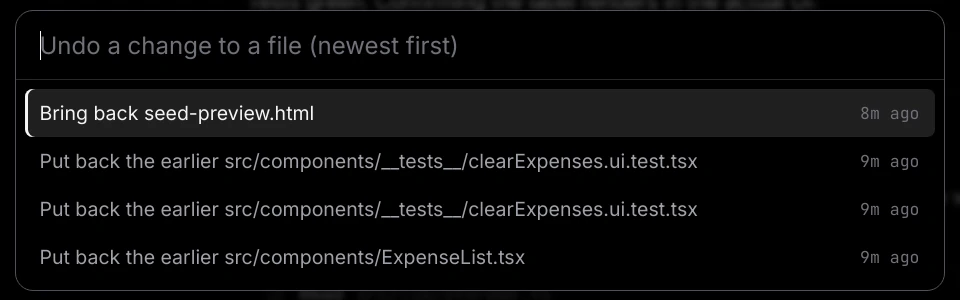
The list opens with the placeholder "Undo a change to a file (newest first)". Each row says what choosing it will do, with how long ago the change happened on the right ("just now", "5m ago", "2h ago", "3d ago", or a date). Type part of a file's path to narrow the list.
3. Choose a row
Click it, or move to it with the arrow keys and press Return. The earlier version is put back at once and you see "Restored path. Undo it again from the same list." If the file is open in a tab, the tab reloads, and the Explorer and Source Control catch up.
What each row means
- Put back the earlier path — the file was overwritten, by Torki or by a save. Choosing it puts back the version from before that change.
- Bring back path — the file or folder was deleted. Choosing it puts it back where it was.
- Undo moving path — the file was moved or renamed. Choosing it puts a copy back under its old name and place. The file under its new name stays where it is; delete it if you do not want both.
- Bring back what was at path — another file was moved or renamed on top of this one. Choosing it puts back the file that was there before.
- Undo path — an earlier restore from this list. Choosing it goes back to how the file was before that restore.
The same file can appear several times, once for each change, because each row is one moment in that file's history. The newest is at the top.
What Torki keeps a copy of
A copy is taken whenever an existing file or folder is about to be overwritten, moved or deleted through Torki Code itself. That covers:
- Torki's changes — a file it rewrote or edited, a file or folder it deleted or moved, and a generated image saved over an existing one.
- Your own changes in the app — saving over a file with ⌘S, renaming or dragging in the Explorer, and deleting in the Explorer.
It does not cover:
- A file that was only created. There was nothing there before, so there is no earlier copy. Delete the new file if you do not want it.
- Anything a command did. Files changed by a build, a script,
npm installor anything else that runs as a command, whether Torki ran it or you ran it in the terminal, are not copied. - Git. Commits, Discard changes, Pull, Push and switching branches are not recorded here and cannot be undone from this list.
- Anything outside the open folder. Torki only works inside it, and only keeps copies of what is inside it.
- Changes made in another app, such as another editor or Finder.
The Explorer's delete question still says "Delete path? This cannot be undone." In fact, a file or folder of 8 MB or less that you delete there appears in this list as Bring back path, as long as it is among the last 40 changes.
Limits
- The last 40 changes in each folder. When a 41st arrives, the oldest drops off. Your own saves count towards the 40, so a lot of saving pushes older changes out sooner.
- 8 MB. A file larger than 8 MB is not copied, and a folder is not copied if its contents add up to more than 8 MB. The change still happens; it just has no row in the list. When a folder is copied, any
node_modulesand.gitinside it are left out. - Per folder, on this Mac. Each project folder has its own list, and it is still there when you open the folder again tomorrow. The copies are kept in Torki's own data folder (
~/Library/Application Support/torki-desktop/code-undo), not in your project, so they never show up in your files, your searches or git. They do not sync to another Mac. - One row at a time. Each choice puts back one file or folder. To reverse several changes, choose each one.
Projects on a server
Undo works on a project on a server too. Torki works on a copy of the server folder kept on this Mac, the list holds the changes made to that copy, and a restore is sent to the server like a save. Changes that arrive from the server, made there by something else, are not in the list. See Working on a Project on a Server.
Undoing an undo
Putting a file back replaces what is there now, so Torki keeps a copy of the current version first. The restore then appears at the top of the list as Undo path. Choose it to go back to how the file was before you restored it.
Bringing back a deleted file has nothing to keep a copy of, because nothing was there. If you change your mind, delete the file again.
Undo, git and Discard changes
- Undo a file change never touches git. It does not commit, stage, or rewrite history. A file you put back shows in Source Control and Git as a change like any other, so you can review it and commit it if you want to keep it.
- Discard changes in Source Control is different: it throws away a file's uncommitted edits and goes back to the last commit. It always asks first, and it is not recorded in this list, so it cannot be undone here.
- Git reaches further back. This list holds only the last 40 changes. For anything older, or for a whole task's worth of changes at once, use git: commit before a big task, and you can see and discard exactly what it changed afterwards.
Good to know
- Asking Torki to "undo your last change" still works. It puts back whatever is newest in this list, which can be one of your own saves rather than Torki's change. Asked twice, it swaps the same file back again rather than going further back. The list lets you choose exactly which change to reverse.
- Putting a file back is your own action, so it never asks for approval, even in Manual. See Permission Modes and Approvals.
- If a restore fails you see why, for example "That snapshot is no longer on disk." or "Could not restore path: …".
- With no folder open, the list says "Open a folder first." With nothing recorded yet, it says "Nothing to undo. Torki keeps a copy of a file before anything overwrites, moves or deletes it; a file that was only created has no earlier copy."
- The Ledger lists what Torki made; this list is for going back. See Sessions, History and the Ledger.
FAQ
Does the arrow under an answer undo everything that answer did?
No. It opens the list of recent file changes in the folder, and you put back one file or folder at a time. The list is the same under every answer.
Why is a change I made missing from the list?
It may have been a new file (nothing to go back to), a change a command made, a git operation, a file larger than 8 MB, or older than the last 40 changes in this folder.
Can I get back a file I deleted in the Explorer?
Yes, if it was 8 MB or less and is still among the last 40 changes. Open the list and choose Bring back path, even though the delete question said it could not be undone.
I put back the wrong version. Can I reverse that?
Yes. The restore is at the top of the list as Undo path. Choose it.
Does Undo ask for approval in Manual mode?
No. Putting a file back never asks, in any mode.
Does it undo a commit or a push?
No. Git operations are not recorded here. Use git in the terminal to undo a commit.
Does it work on a project on a server?
Yes. The restore is sent to the server. Changes made on the server by anything else are not in the list.
Does it cost messages?
No. Putting a file back is not a request to Torki.